See everything on the card
Graphics and compute processes, with readable names and app icons, plus each one’s CPU and RAM use alongside its VRAM. A ten-minute memory graph shows what changed.
 VRAM Manager · free & open source · beta
Forty minutes after you stopped using it. VRAM Manager shows which apps hold your GPU memory, flags the ones sitting idle, and lets you quit them when you choose. Nothing is stopped automatically.
Ubuntu 24.04 · NVIDIA GPU with a working nvidia-smi · MIT licence
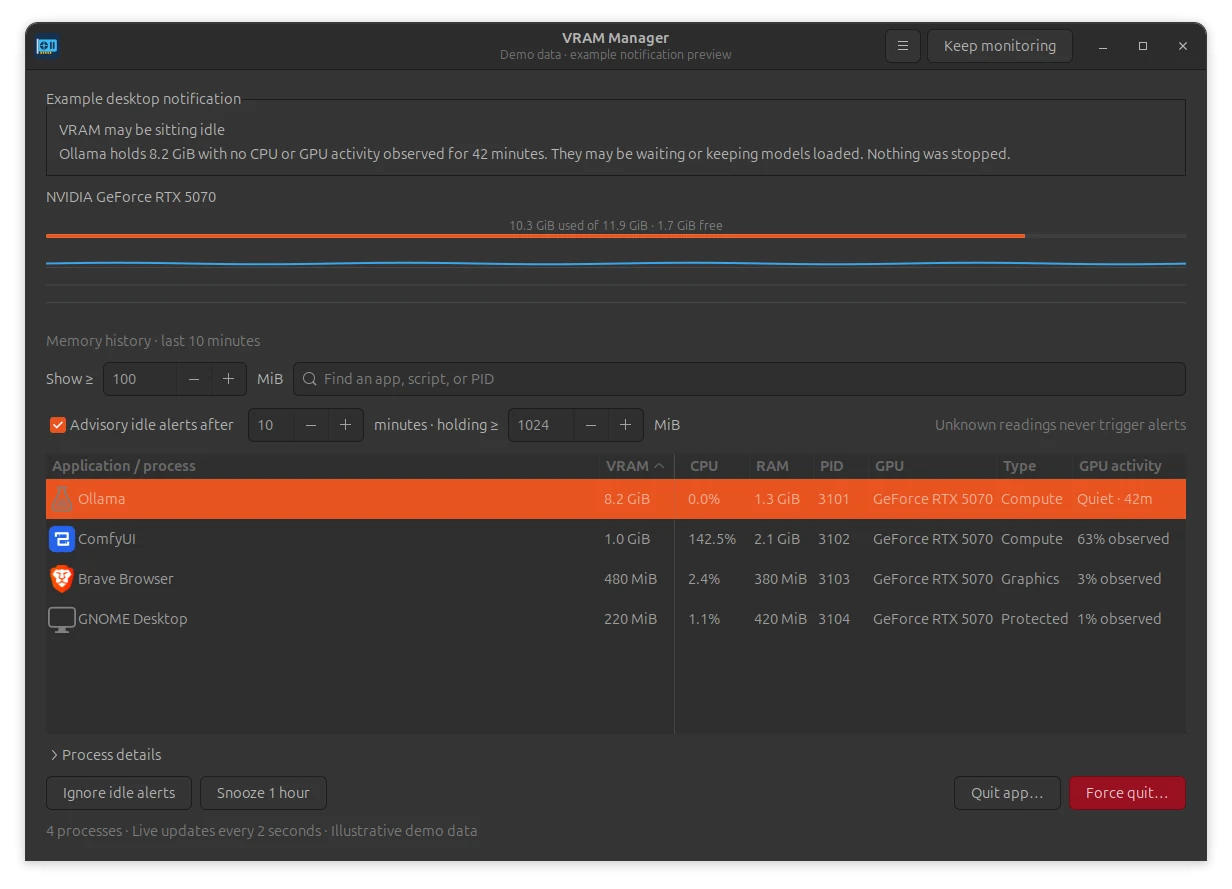
Graphics and compute processes, with readable names and app icons, plus each one’s CPU and RAM use alongside its VRAM. A ten-minute memory graph shows what changed.
Optional alerts when an app holds more than your threshold (1 GiB by default) with no GPU work and near-zero CPU for ten minutes. Missing readings never count as idle, and it stays quiet in Do Not Disturb.
Quit or force-quit after a confirmation that names the target. It signals that exact process even if its ID gets reused, protects the desktop’s own processes and never asks for admin rights.
Live VRAM use next to the clock. Click for the full window, pause alerts for an hour, or quit. It starts at login, and you can turn that off.
Download the .deb from the release page (check it against SHA256SUMS if you like), then in that folder:
# install
sudo apt install ./vram-manager_0.1.0-beta4_all.deb

# run it, or open VRAM Manager from Applications
vram-manager

# remove
sudo apt remove vram-managerMeasured over 30 seconds on one machine (RTX 5070, driver 580). Other GPUs, drivers and multi-GPU setups still need testing; AMD, Intel, Windows and macOS aren’t supported. Found a problem? Open an issue.